Meet Horizon UI · 8/17: Browser Errors & Source Maps
This is the eighth post in the Meet Horizon UI series. Part 7 was your services’ logs; this one is your users’ errors — the JavaScript exceptions the browser agent reports — and the one capability that turns them from noise into something you can act on.
A production JavaScript stack is unreadable. Your code shipped minified and bundled, so the browser reports an error at app.min.js:1:98412 — a position into machine-generated soup that tells you nothing. The point of this feature is to walk that stack back to your source: the original file, line, column, symbol name, and a snippet of the code around it — frame by frame — by pointing the error at the right source map.
The browser-error feed
On the BROWSER layer, the Browser Logs tab (the on-screen label — it’s specifically the JavaScript-error feed) lists what your browser agent reports. The BROWSER layer renames its slots to match its world — services become Applications, instances Versions, endpoints Pages — and the feed reads like the Log Explorer: a clickable category legend with counts and a density histogram over a stream of rows. Each row carries the time, the category, the page, the app version, and the error message — with the minified line:col shown as a chip when there is one.
You scope it with the same triage instincts as the trace and log tabs: it owns its own Time range (the global topbar is paused), and you narrow by Version, Page, or Category and hit Run query — there’s no background polling to shift the view under you, and no query language to learn, just structured controls. Click a row and it expands inline, right there in the stream.
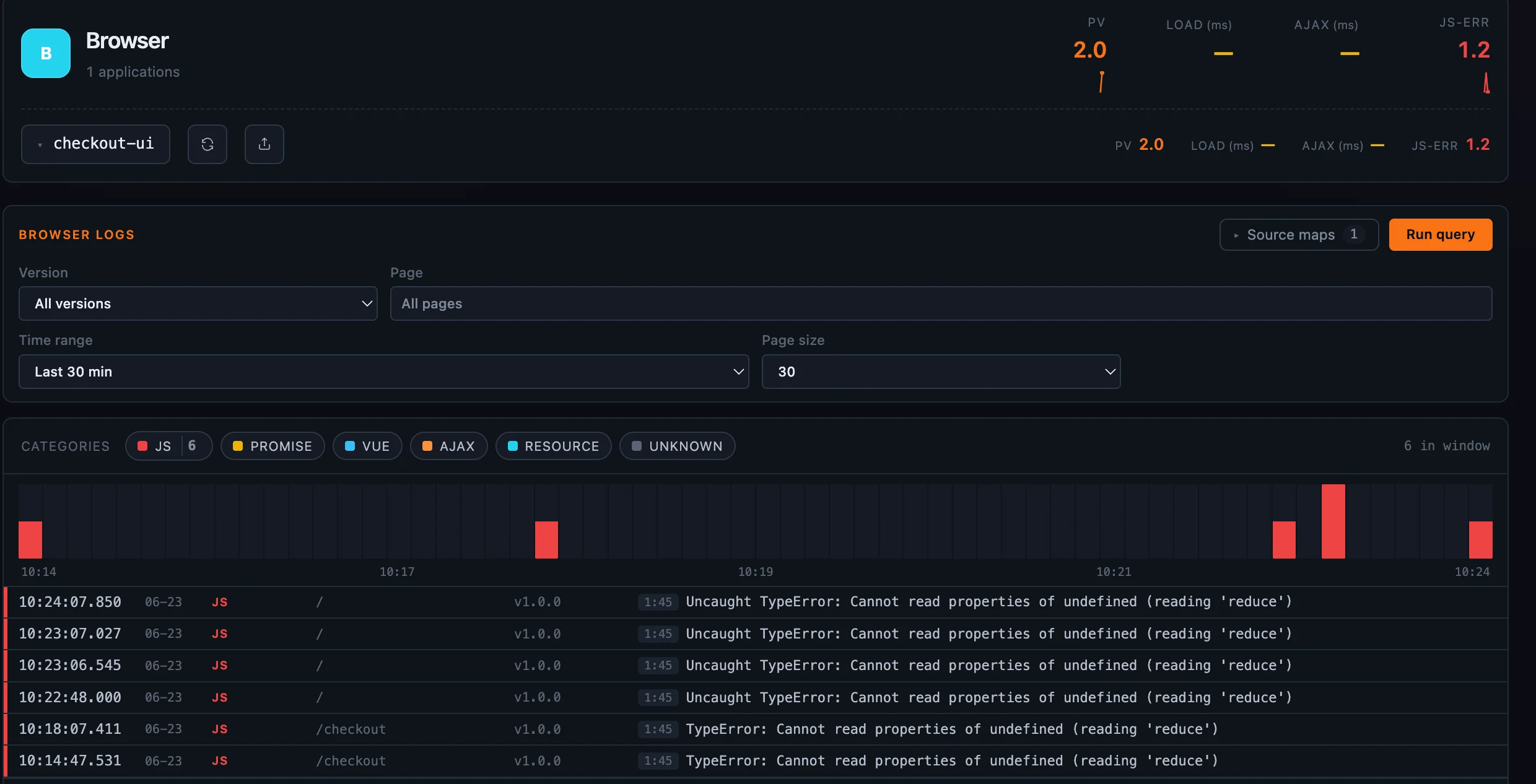 Figure 1: The browser agent’s error feed — categorized, charted, and scoped to one app’s version and pages.
That minified line:col is the whole problem in miniature. It’s a real position — but into your built bundle, not your source. Which is where the rest of this post comes in.
From a minified stack back to your source
Expand an error and the panel splits in two: on the left, the raw stack exactly as the browser reported it (the gibberish); on the right, where you resolve it. Pick a source map from the dropdown and click Resolve, and Horizon parses the stack and maps every frame through that map:
- each frame’s original
file:line:column, - the original symbol name (when the map carries it), and
- a few lines of the original source around the offending line, with the hit line highlighted (when the map embeds
sourcesContent).
A frame the map doesn’t cover is shown honestly as unmapped. So a stack whose top frame read app.min.js:1:45 resolves to computeCartTotal at checkout.ts:2:20, with the lines of checkout.ts around it — the cart.items.reduce(...) that actually threw — sitting right there, the whole stack top to bottom, not just the first frame.
It’s careful about the details that make this either trustworthy or quietly wrong: browser stacks count columns from 1 while source maps count from 0, so the resolver shifts before each lookup — and that path is tested against real bundler output, not a hand-made fixture.
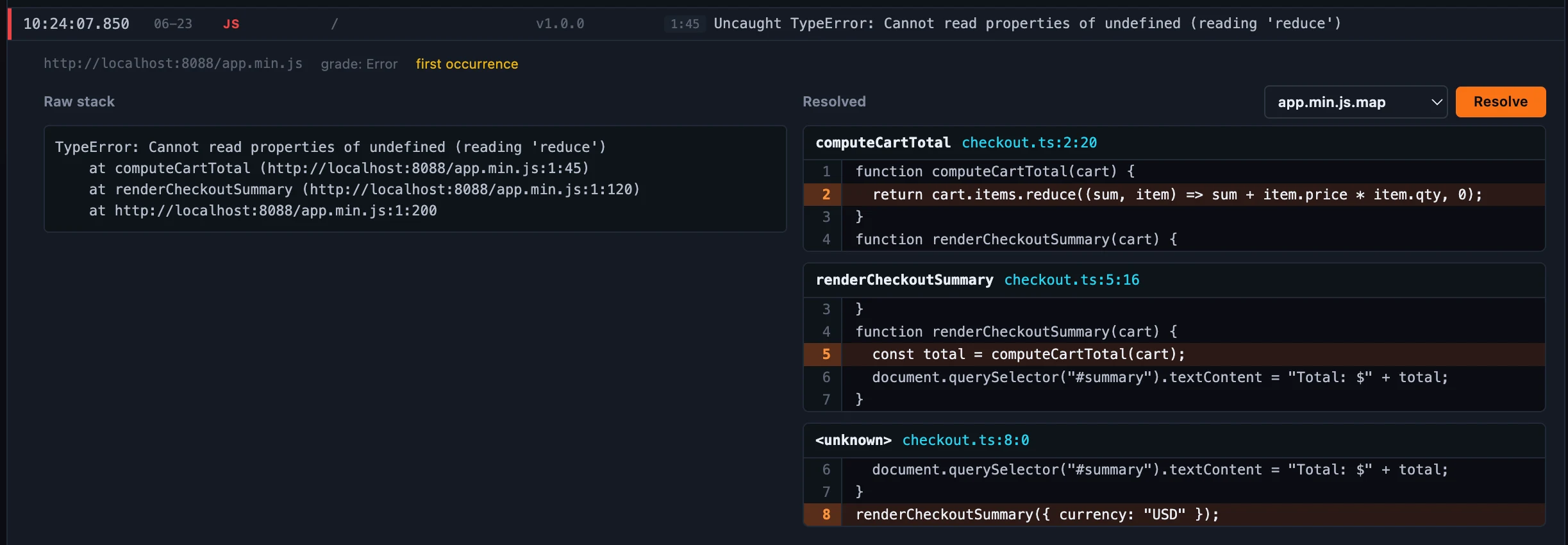 Figure 2: The hero — point a minified stack at the right map and read it back in your own source, frame by frame.
Which errors carry a stack to resolve
Not every category has something to translate. JS, PROMISE, and VUE are real JavaScript errors whose stack points into your bundle — these resolve. AJAX and RESOURCE are network and load failures; their “stack” is an HTTP status or a failed URL, not code, so there’s simply nothing for a source map to map (Horizon doesn’t block them — there’s just no JavaScript there to walk back). Frames from code with no source map, or from eval/inline scripts, stay unmapped too. (JS is also the only category the browser reports a top-level line:col for; the others carry their position inside the stack string, which the resolver parses.)
Getting maps in: upload, or mount
A map has to be available before you can resolve against it, and there are two ways to provide one — deliberately different in durability:
- Upload a
.mapstraight from the tab. It’s held in the server’s memory only — there’s no backend storage — and it’s temporary by design: it counts against a memory budget, is evicted least-recently-used under pressure, is lost when the server restarts, and (in a multi-instance deployment) lives only on the instance that received it. This is the fast path for ad-hoc triage: drag a map in, resolve, move on. - Mount
.mapfiles into the server’s source-map directory (/app/sourcemapsin the container image, viaHORIZON_SOURCEMAPS_DIR). These are validated as Source Map v3 at boot, read from disk on demand (so they never sit in the memory budget), survive restarts, reload on their own, and can’t be deleted from the UI. This is the durable, production path — bake your builds’ maps into the image and they’re always there.
The manager shows each map’s origin (an uploaded · temporary map vs a mounted · durable one) and the live memory usage against the budget; budgets (a per-file cap and a total resident-upload cap, 64 MiB and 512 MiB by default) live in a sourceMaps block in horizon.yaml.
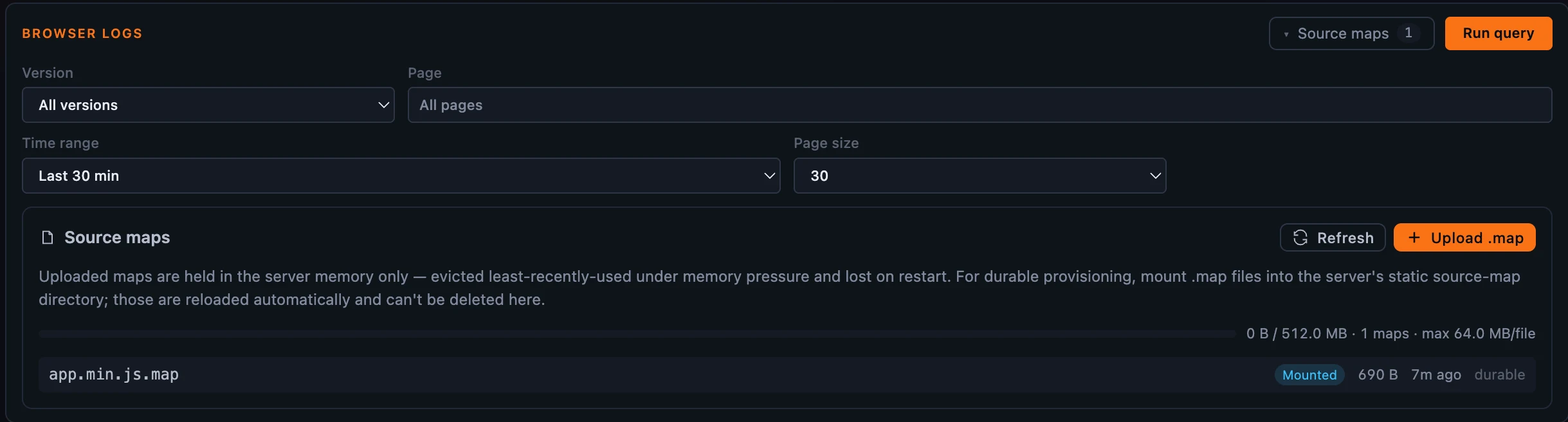 Figure 3: Two ways to provide a map — upload for a quick triage, mount for the durable, production set.
You pick the map — on purpose
One thing Horizon deliberately does not do is guess. The browser agent reports an app version but no exact build fingerprint, so there’s no safe way to auto-match an error to a map — and applying a map from the wrong build gives you confidently wrong line numbers, which is worse than no answer. So the choice is yours: pick the map that matches the error’s build, and keep your maps labelled by version. (One caution worth stating plainly: a source map’s sourcesContent embeds your original source code, so treat the maps you upload or mount as sensitive, and provision them only on servers you trust.)
That manual-by-design choice also draws a clean permission line. Viewing the errors, listing the maps, and resolving a stack are all reads, gated by browser-errors:read; uploading or removing a map is a write, gated by source-map:write. So a read-only viewer can de-obfuscate stacks all day without ever being able to change what maps are loaded — reading is reading, mutating the map store is a write.
Where to go next
For the field reference — the categories, the two provisioning paths, the budgets and the matching-maps-to-builds guidance — see the Browser Logs & Source Maps docs.
Next up: Profiling — five profilers (trace, async, eBPF, Go pprof, network) rendered through one flame graph.